Turn Existing Training into Reusable Learning Resources
AI tools for learning and development usually add another platform to administer. y2map does something different: it works as a learning transformation layer on the expertise you already own — turning existing training videos, PDFs, presentations and expert explanations into a single cognitive artifact that makes your first pass quick, deepens understanding, and strengthens retention.
The primary promise: reduce the recurring cost of explaining the same information to different people. The secondary promise: extract more value from existing training investments by making organizational knowledge easier to understand, visualize, revisit and apply.
Give employees a clearer starting point, help subject-matter experts share what they know, and turn existing training material into reusable resources that encourage collaboration, critical thinking and practical application.
Transform Training Videos, PDFs and Presentations into Visual Learning Maps and Guided Questions
- Summarize — Extract the essential knowledge and inspect its original evidence.
- Orient — Introduce the overarching principles employees need first.
- Visualize — Illustrate complex relationships and important dependencies.
- Question — Encourage employees to explain, predict and apply what they learn.
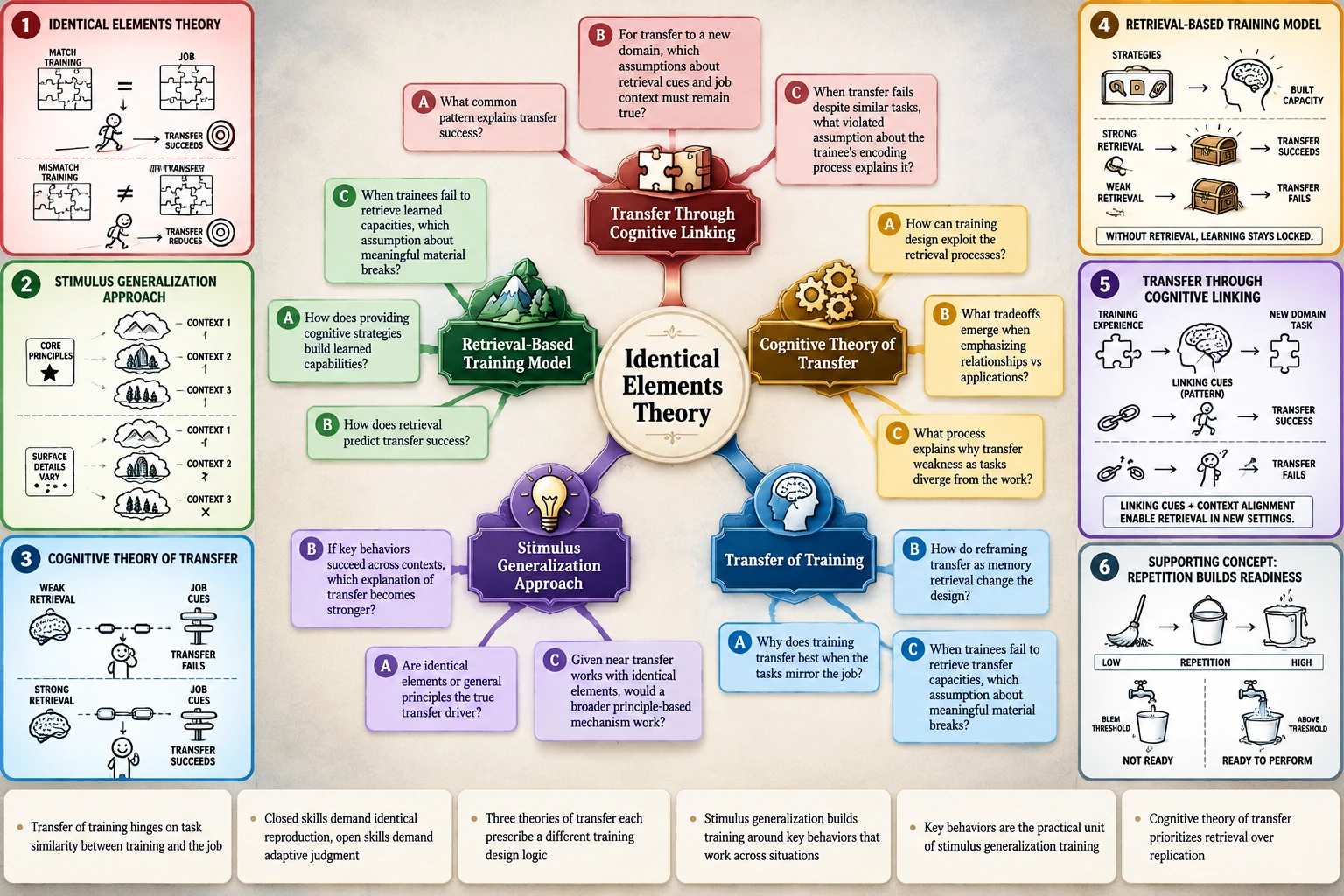
Stop explaining the same information over and over
Most organizations possess substantial training material — recorded workshops, product demonstrations, technical documentation, policy PDFs. A single advance organizer is much more accessible, reduces cognitive load and helps you get the most out of your material.
Below is the recurring cost L&D teams know well:
- Repeated explanations. Experts spend valuable workshop time re-teaching foundational concepts instead of exploring advanced applications and new ideas.
- Unprepared learners. Employees arrive without a shared mental model, slowing discussions and limiting how deeply they can engage.
- Inaccessible expertise. Valuable subject-matter knowledge remains trapped in dense documents and recordings because making it accessible takes time and instructional design expertise.
- Duplicated development. Departments repeatedly rebuild overlapping training materials instead of transforming existing knowledge into reusable learning assets.
- Passive learning, limited transfer. Employees complete training without developing the conceptual understanding and questioning skills needed to apply knowledge, challenge assumptions, and solve unfamiliar problems.
1. Establish the conceptual foundation
Introduce the overarching principles, essential concepts and relationships that organize unfamiliar material. Employees build a shared mental model before training begins, accelerating comprehension and freeing workshop time for advanced applications, problem-solving and collaborative exploration.
2. Visual learning cards — make complex knowledge intuitive
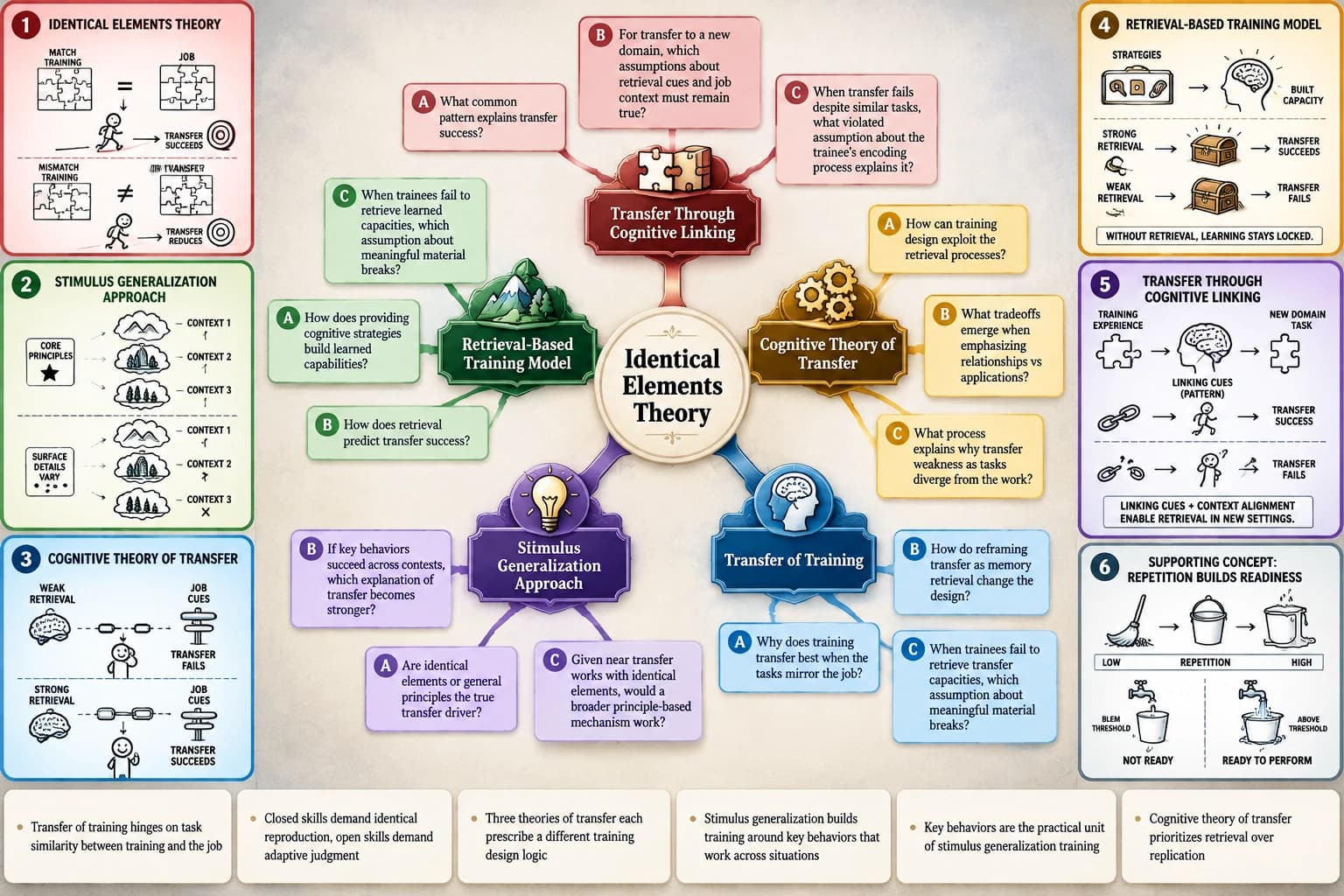
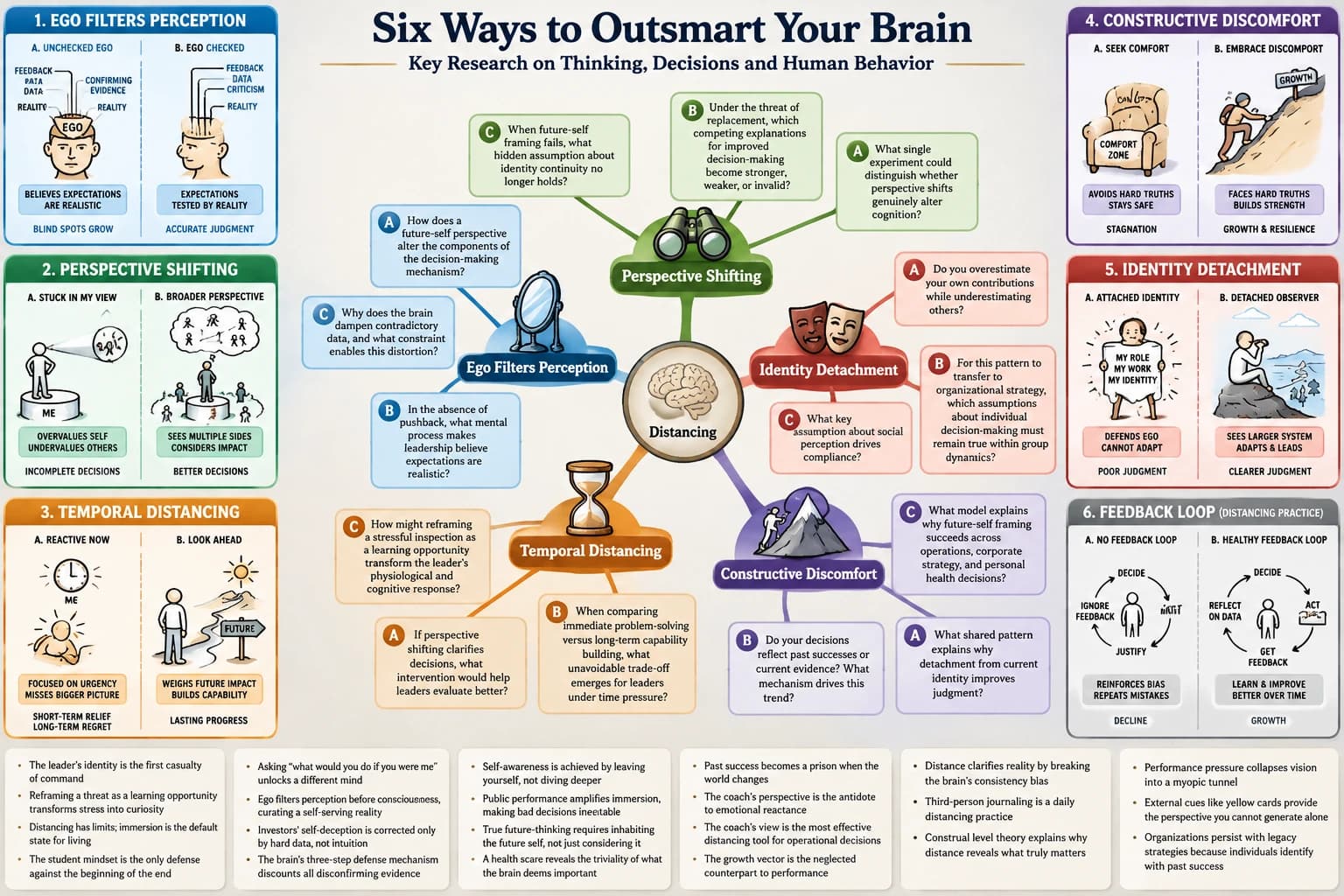
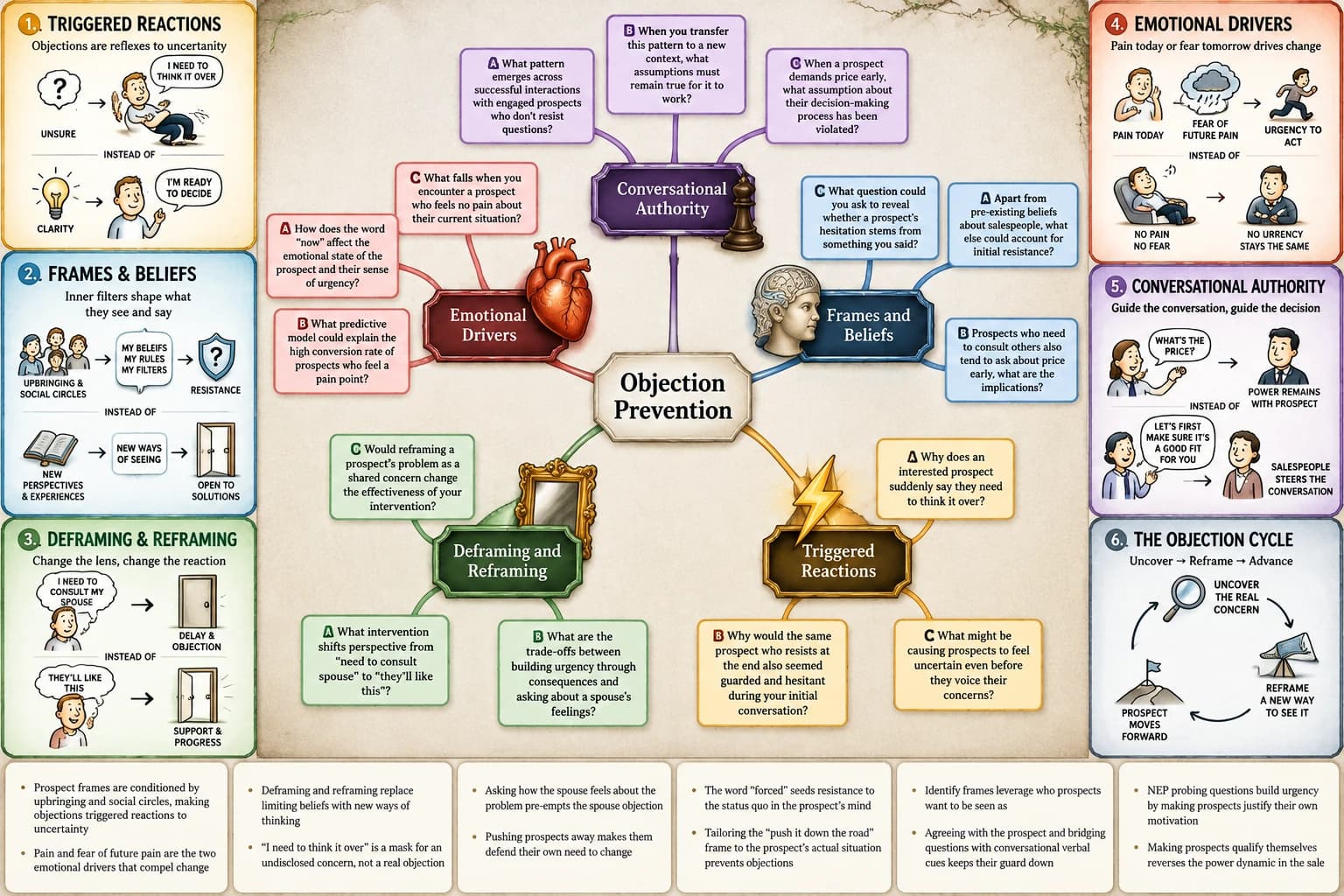
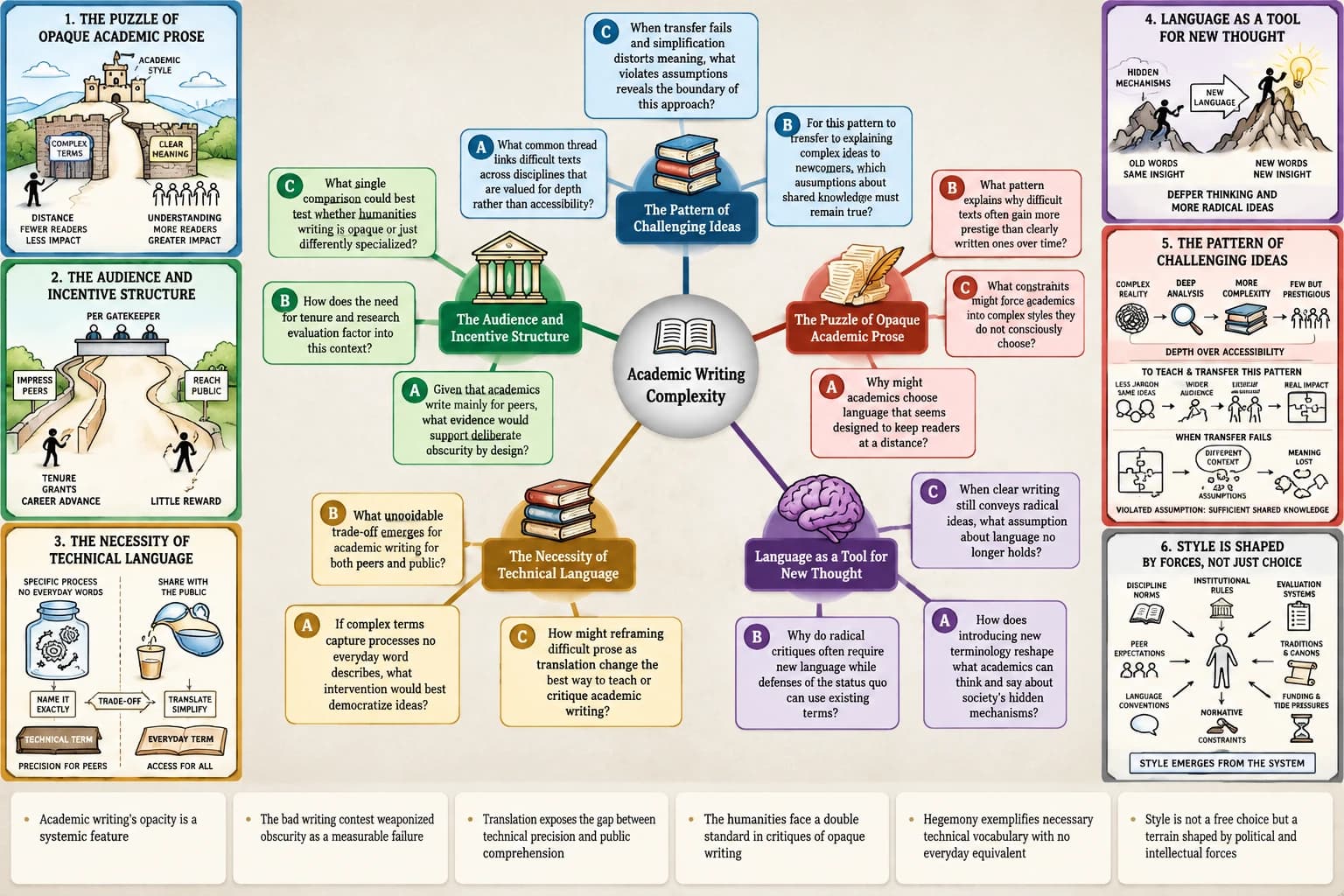
Six illustrated cards translate abstract principles into concrete visual mechanisms, examples and relationships. Employees can grasp difficult concepts faster, connect theory to practice and navigate complex technical or organizational knowledge with greater confidence.
3. Socratic questioning mindmap — turn shared understanding into deeper thinking
A structured mindmap connects core concepts to questions that prompt employees to explain relationships, test assumptions, predict consequences and explore alternatives. Trainers can move quickly into meaningful discussion, challenge conventional thinking and facilitate collaborative brainstorming around realistic workplace problems — creating more engaging sessions focused on discovery, innovation and practical application.
The resulting resources support onboarding, technical training, compliance education, workshops, self-directed learning and organizational knowledge transfer.
Built for every role in the learning-content lifecycle
| Persona | Existing problem | y2map demonstration | Value |
|---|---|---|---|
| Chief Learning Officer | Significant training investment without clear evidence of application | Standardized learning maps and application-oriented questions connected to practical decisions | More reuse of training investments, consistent learning |
| L&D Director | Training materials scattered across departments and formats | Approved summaries, visual maps and question sets organized into a learning library | Less duplicated development, easier navigation |
| L&D Manager | Continuous onboarding requests and recurring course maintenance | Existing material transformed into reusable learning companions | Less repetitive preparation and maintenance |
| Instructional Designer | Dense SME knowledge is difficult to translate into accessible lessons | Six advance organizers, meaningful illustrations and progressively challenging questions | A structured foundation for instructional development |
| Corporate Trainer | Employees arrive unprepared and struggle to retain workshop content | Organizers shared before training, question maps during and after sessions | More structured workshops and reinforcement |
| Onboarding Specialist | New employees receive overwhelming documentation collections | Role-specific learning maps and prerequisite pathways | Structured orientation, fewer repeated explanations |
| Technical Training Manager | Documentation assumes substantial technical knowledge | Illustrated systems, dependencies, prerequisites and failure scenarios | More accessible technical learning pathways |
| Compliance Training Manager | Employees must interpret lengthy policies correctly | Source-linked explanations and expert-reviewed scenario questions | Clearer explanations, verifiable understanding |
| OD Manager | Employees lack visibility into other departments' processes | Mapped cross-functional dependencies and facilitated discussions | Greater shared understanding of complexity |
| Learning Experience Designer | E-learning encourages passive clicking rather than application | Prediction, explanation and retrieval activities added to existing material | More constructive learner engagement |
The same architecture extends across the business — engineering managers building technical onboarding maps, operations managers converting SOPs into visual training, marketing teams repurposing webinars — each covered by the same content-transformation workflow.
Bring your experts, trainers and managers around the same blueprint
A subject-matter expert knows how a process works. An instructional designer knows how to structure the explanation. A manager understands where employees struggle. A trainer knows which questions repeatedly arise. Collaborative instructional design fails when these four perspectives never meet over the same artifact.
y2map's visual outputs give them a common reference. The evidence-backed summary lets participants inspect the original expert explanation; the six advance-organizer cards establish what employees need to understand first; the illustrated map makes conceptual relationships visible; and the driving questions reveal where additional explanation or practice is required.
| Traditional L&D activity | Shared-blueprint alternative | Value |
|---|---|---|
| An instructional designer interviews an SME repeatedly | Both examine a structured, source-backed map from approved material | More focused expert discussions |
| Training slides are reviewed independently | Experts and designers inspect the same relationships and evidence | Easier identification of omissions |
| Managers receive completed training without contributing context | Managers add real workplace scenarios and recurring questions | More relevant learning activities |
| Employees attend workshops without preparation | Participants review six advance-organizer cards beforehand | A common starting point |
| Departments create overlapping training materials | Cross-functional teams identify reusable concepts | Reduced content duplication |
| Completed training is stored without follow-up | Trainers use driving questions for reinforcement | More opportunities to revisit and apply |
The 60-minute collaborative learning-design workshop
| Stage | Duration | Activity | y2map contribution |
|---|---|---|---|
| Prepare | Before | Select approved documents, recordings and expert explanations | Summaries, organizer cards, maps and driving questions generated |
| Establish context | 10 min | Agree on audience, learning objectives and prerequisites | Six advance-organizer cards |
| Inspect the blueprint | 15 min | Examine relationships; identify confusing or missing explanations | Illustrated learning map and supporting evidence |
| Challenge assumptions | 15 min | Ask what employees must actually do and where errors occur | Driving questions on causes, consequences, alternatives |
| Design application | 15 min | Develop realistic scenarios, practice activities and feedback | Adapted explanations and questions |
| Agree on next steps | 5 min | Assign approval, verification and pilot testing | Reviewed learning resources retained |
Give every new employee a clearer starting point
AI employee onboarding usually means more content. y2map means better structure: role-specific learning maps built from your employee handbook, introductory videos and process documentation. New hires review six advance-organizer cards covering their role's purpose, essential processes and prerequisite knowledge, then navigate an illustrated map of responsibilities and dependencies — with driving questions to structure their first conversations with their manager. Fewer repeated introductory explanations; more independent preparation.
Turn complex expertise into accessible explanations
For AI instructional design, y2map is the bridge between expert knowledge and learner-ready material. Source-backed summaries capture the expert's central explanations with their original context intact; advance organizers establish what learners need first; illustrations carry the difficult abstractions; and progressively challenging questions turn the material into activities. SMEs review and approve everything — their time goes to verification and refinement, not repetition.
One expert. One recorded workshop. Multiple reusable learning resources.
A senior engineer repeatedly delivers the same introductory workshop to new hires. The L&D team uses an approved recording and the technical documentation to create a structured learning companion:
- Source-backed explanations — the engineer reviews the extracted principles and supporting evidence.
- Six advance organizers — new employees get an overview before the original training.
- Illustrated technical map — employees examine system components, relationships and dependencies.
- Application questions — employees investigate realistic failures and explain their responses.
Make workshops more interactive
Corporate trainers use y2map to restructure the workshop lifecycle: advance organizers before the session so everyone arrives with the same conceptual frame; evidence-backed summaries and illustrated maps during it, so discussion anchors to the source material; and driving questions after — prediction, explanation and application prompts that turn a one-off event into reinforcement. Scenario-based questions ask employees what happens when a step fails, why it happened and what they would do next.
Make complex systems easier to understand
AI technical training with y2map starts from what documentation usually assumes: prerequisite concepts. Maps illustrate system architecture, component dependencies and operational relationships; explanations anchor to the technical source; and failure-analysis questions ask employees to predict behavior and reason through causes. The result is a technical learning pathway employees can navigate — and reason within — rather than memorize.
Make policies easier to navigate and question
AI compliance training demands accuracy and traceability. y2map creates source-linked explanations of approved policies — every claim anchored to the original policy text — plus expert-reviewed scenario questions that check whether employees can apply the policy, not merely recognize it. Nothing deploys without compliance-expert approval.
Build on what your organization already knows
The strategic outcome is an AI knowledge management asset for learning: a reusable library of approved summaries, illustrated learning maps, advance organizers and question sets — organized by role, subject and learning objective, and reviewed through explicit approval workflows. Onboarding cohorts reuse it; departments share it; expert time goes to advancing knowledge rather than repeating it.
What workplace research tells us
External research establishes that these problems are commercially significant. Figures should be verified against the original publications; they are not y2map customer outcomes.
| Research source | Published evidence | Relevance |
|---|---|---|
| ATD State of the Industry (2025) | Average direct training expenditure of $1,054 per employee; orientation, compliance and managerial training among the most common areas | Prioritizes onboarding, compliance and manager training as distinct use cases |
| Microsoft Work Trend Index (2023) | 62% of respondents reported spending too much time searching for information | Establishes the broader cost of fragmented organizational knowledge |
| Workplace training-transfer review (2026) | A systematic review of 45 studies (24,096 participants) found fragmented evaluation approaches | Supports measuring workplace application, not just completion |
| Retrieval-practice meta-analysis (2018) | Practice testing supports transfer under identified conditions | Grounds question-based reinforcement, with outcomes depending on instructional design |
| ATD e-learning research | Mandatory and compliance training are prominent e-learning applications | Supports role-specific learning resources built from common source material |
Illustrative y2map pilot scenarios
Proposed demonstrations — labeled as such until supported by actual customer pilots.
| Scenario | Source material | Output | What to measure |
|---|---|---|---|
| New-hire onboarding | Handbook, introductory videos, process documentation | Reusable onboarding companion | Preparation time, orientation time, knowledge checks |
| SME knowledge capture | Recorded expert presentations, technical documentation | Approved expert-knowledge map | Expert review hours, content reuse |
| Compliance training | Approved policies and existing material | Compliance learning companion | Scenario accuracy, understanding |
| Technical reskilling | Architecture documents, training videos | Technical learning pathway | Preparation time, demonstrated competence |
| Manager training | Leadership workshops, internal guidance | Reusable manager-training resource | Participation, follow-up application |
| Cross-functional learning | SOPs, departmental process documents | Shared operational learning map | Understanding of handoffs, identified gaps |
| Existing-course modernization | Legacy slides, recordings, learning objectives | Updated learning materials | Development time, learner performance |
From understanding to workplace application
y2map's instructional sequence is grounded in learning research — before, during and after training:
Before training — orient employees. Review six illustrated advance-organizer cards to establish the subject's overall structure, important relationships and prerequisite knowledge.
During training — examine and connect the ideas. Use evidence-backed summaries and illustrated learning maps to inspect the original explanations, connect related concepts and understand complex dependencies.
After training — explain, predict and apply. Use driving questions for retrieval, realistic workplace scenarios and discussion of alternative explanations. Revisit the learning map, check understanding and evaluate performance in actual workplace tasks.
| Learning principle | y2map capability | Workplace application |
|---|---|---|
| Advance organizers (Ausubel) | Six illustrated conceptual overview cards | Prepare employees for an unfamiliar system before detailed documentation |
| Schema formation | Overarching principles and conceptual relationships | Help new employees organize unfamiliar organizational knowledge |
| Scaffolding | Organizers followed by increasingly detailed explanations | Structure onboarding from foundations toward complex responsibilities |
| Cognitive load theory | Summaries, visual hierarchy, organized explanations | Less effort navigating lengthy training materials |
| Dual coding | Meaningful illustrations combined with verbal explanations | Abstract technical and organizational relationships become examinable |
| Concept mapping (Novak) | Visual maps connecting concepts and dependencies | Explain how components of a system or process interact |
| Generative learning (Wittrock) | Questions requiring constructed explanations | Employees integrate training material with existing knowledge |
| Generation effect | Prediction questions before explanations | Learners formulate answers before reviewing the source |
| Elaborative retrieval | Questions connecting several concepts | Retrieve information and explain the reasoning behind it |
| [Abductive reasoning](/research/abductive-reasoning (Peirce) | Questions investigating hidden causes | Explore likely causes of operational failures |
| ICAP framework (Chi) | Reading, explaining, questioning, group discussion | Progressively constructive and interactive engagement |
| Retrieval practice](/research/retrieval-practice) | Questions answered without the source | Reinforce knowledge, reveal gaps requiring further training |
| Metacognition | Questions requiring self-evaluation | Employees identify uncertain concepts and seek clarification |
| Situated learning | Workplace scenarios from organizational knowledge | Connect conceptual explanations with realistic situations |
| Transfer of training | Application-oriented questions and exercises | Apply knowledge beyond the original training context |
| Distributed cognition | Shared visual maps and source-backed explanations | Teams get an external reference for complex processes |
| Communities of practice | Reusable maps from approved expert knowledge | Expertise shared across teams and cohorts |
These connections explain the instructional rationale. The effectiveness of a particular resource still depends on source quality, instructional design, learner characteristics and opportunities for practice — and the learning map provides the foundation, not a substitute for practice, feedback and managerial support.
Turn Training Content into Reusable Learning Resources
Help learners build mental models, expose misconceptions, and apply what they learn.
Learning science and instructional design emphasize the learner’s mental model: what they understand, how they connect concepts, and where their reasoning breaks down. y2map transforms existing training videos, PDFs, presentations and expert explanations into three connected learning resources.
1. Establish the conceptual foundation
Six concise advance-organizer cards introduce the central concepts and relationships before learners engage with the details. Instructional designers establish a shared conceptual foundation that helps learners organize new information.
2. Make abstract concepts intuitive
Illustrated visual learning panels make relationships, mechanisms and unfamiliar ideas easier to grasp. Learners gain a visual framework for connecting details and explaining concepts in their own words.
3. Reveal how learners think
A Socratic questioning mindmap uses generative questions to probe understanding, surface misconceptions and reveal gaps in a learner’s mental model. Questions such as “How would you explain this?” help learners articulate their reasoning, while instructional designers identify where explanations, practice or clarification are needed.
Together, these resources form a reusable learning map: a structured companion for independent study, workshops, knowledge checks and follow-up activities. Experts review the generated content before it reaches learners.
Measure the Value of Reusable Learning Resources
Two economic outcomes, one honest evaluation framework:
Create more value — make every approved training resource work harder.
Existing knowledge becomes reusable explanations, visual learning companions, workshop materials and guided activities. One source supports different audiences and learning contexts after expert review.
Recover time and effort — reduce the cost of repeated explanations.
Employees prepare independently, instructional designers start from a structured foundation, and foundational materials stop being recreated for every cohort.
Measure both before making quantitative claims.
Track content-preparation time, resource reuse, knowledge-check performance and observed workplace application against a pre-adoption baseline. Evaluate results across comparable cohorts and learning contexts where practical.
Training ROI should be demonstrated in pilots, not inferred.
Common questions about AI in L&D
How can AI help L&D teams? Content preparation, knowledge organization, advance organizers, visual learning and guided inquiry — one transformation layer over existing expertise.
Can AI turn existing training videos into learning materials? Yes: the complete source-to-learning-resource workflow, including source timestamps for every claim.
How can organizations reuse existing training content? Standardized explanations, reusable learning assets and expert review — one source serving onboarding, workshops and self-directed learning.
How can AI support instructional designers? Summaries of expert knowledge, advance organizers, illustrations and question sets give designers a structured starting point.
How can companies reduce repetitive onboarding work? Role-specific learning companions built from approved materials give every new hire the same structured starting point.
How can AI support compliance training? Source-linked policy explanations and scenario questions, with mandatory expert review before deployment.
How do you measure the effectiveness of AI-assisted training? Preparation time, resource reuse, knowledge checks and observed workplace application — measured against a baseline.
Can y2map replace an LMS? No. y2map transforms information into learning resources; your LMS continues to handle delivery and administration.
How do I turn a two-hour training video into a visual learning resource? Source-backed summary with timestamps, six organizer cards, illustrated map and guided questions — reviewed by the expert, reused by every cohort.
What is an advance organizer in corporate training? A concise conceptual overview before detailed instruction; six illustrated cards establish the frame employees need first.
How can mindmaps improve technical training? Dependencies, prerequisites and component relationships become visible — employees reason through failures instead of memorizing procedures.
Can AI generate workplace scenario questions? Yes: prediction, explanation and problem-solving questions derived from approved training content.
How can L&D teams capture expert knowledge? From recorded expert explanation to source-backed summaries and conceptual maps, reviewed and approved by the expert.
How can employees use AI learning materials without becoming dependent on them? Independent retrieval, practical exercises, source verification and expert feedback are built into the workflow.
Turn your existing training into a reusable learning resource
One approved source in. Four learning assets out. Employees who prepare independently, experts who explain once, and a learning library that grows more valuable with every cohort.
Transform your training content — or see the learning blueprint workflow on a real, approved training video: the original source beside its evidence-backed summary, six advance-organizer cards, illustrated learning map and the driving questions your next workshop will be built around.